

How it works
- Using the dashboard
- Using the API
The trigger is the first node in the editor.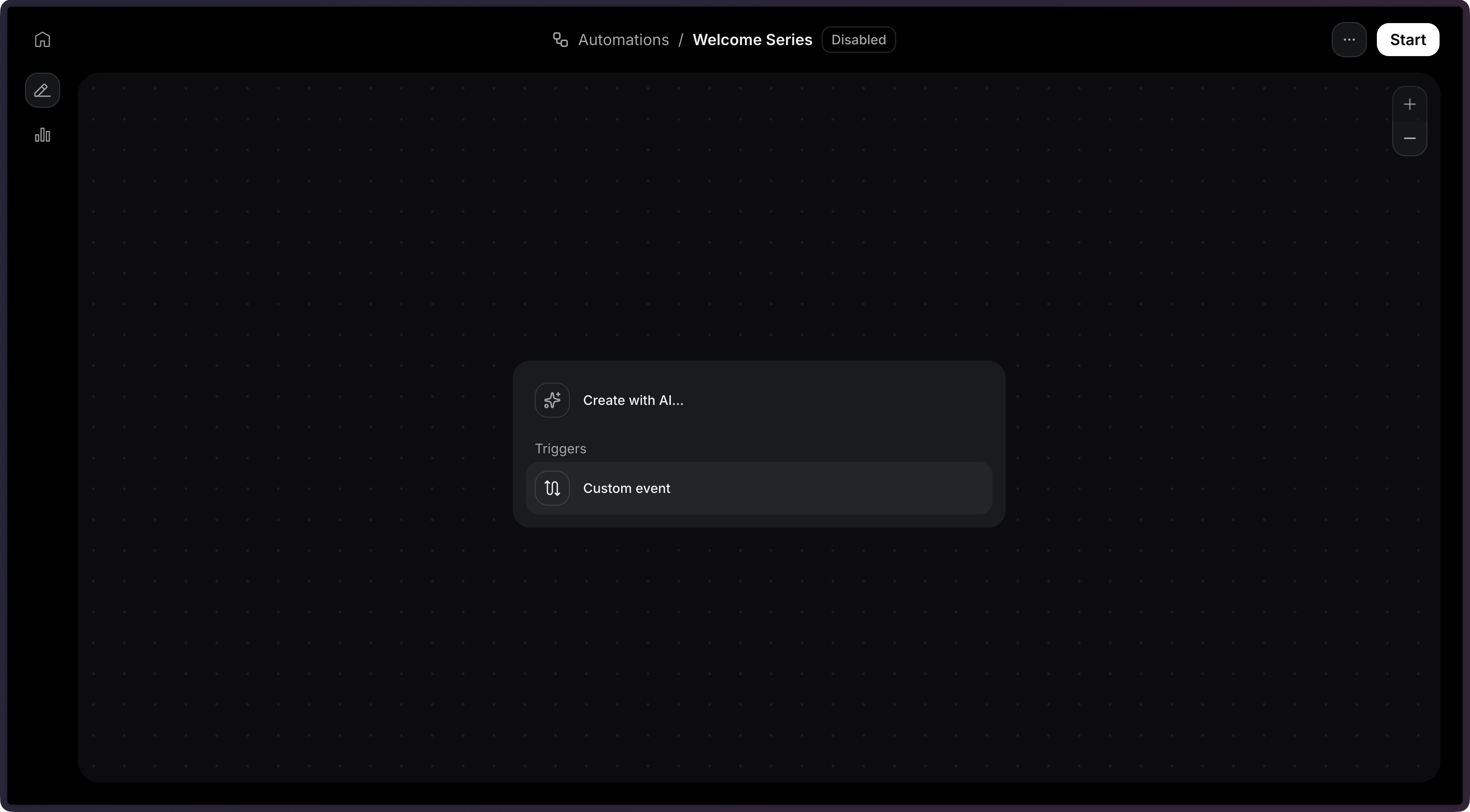
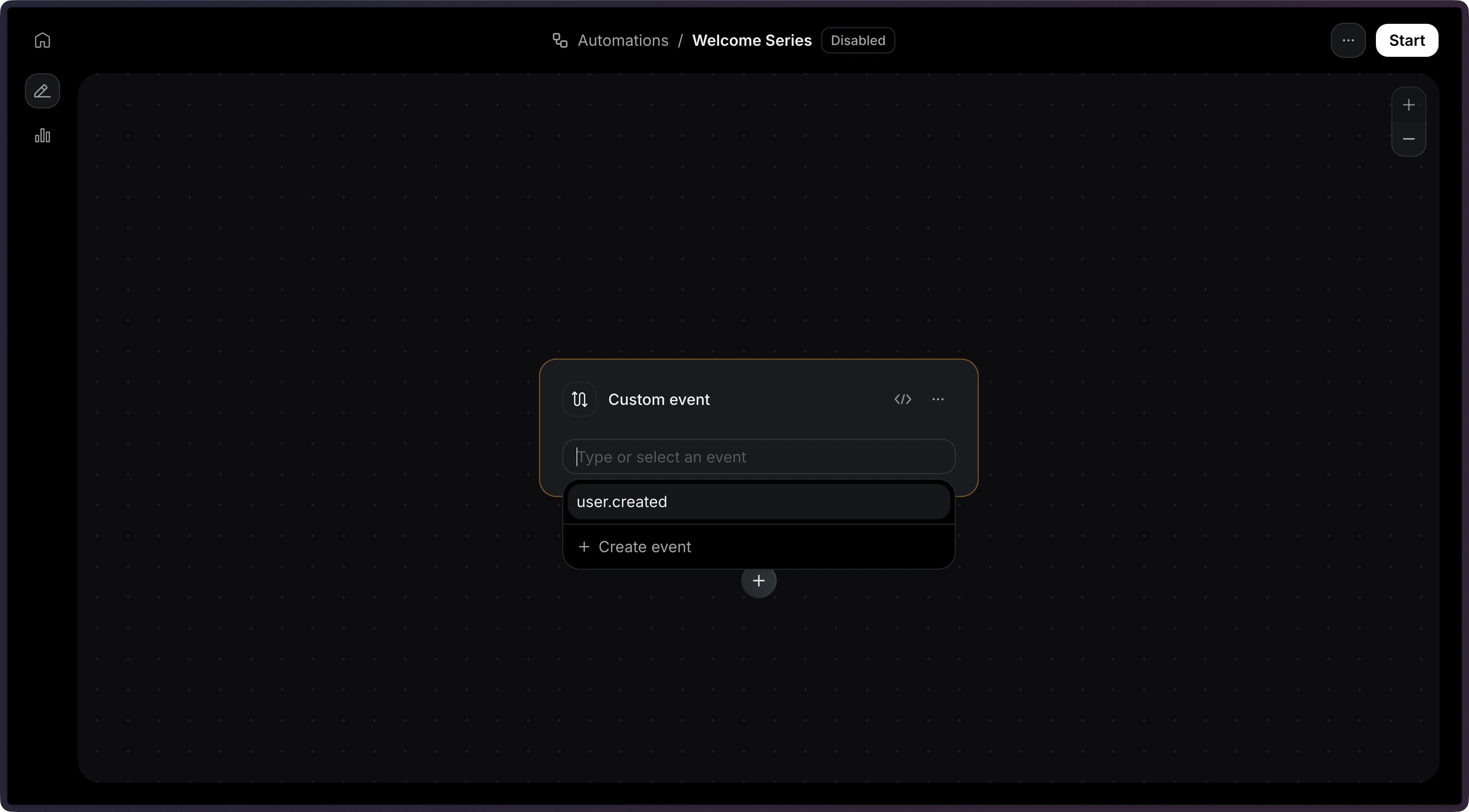
When creating an Automation via the API, the trigger is defined as the first item in the
steps array with type: 'trigger'.import { Resend } from 'resend';
const resend = new Resend('re_xxxxxxxxx');
const { data, error } = await resend.automations.create({
name: 'Welcome series',
steps: [
{
key: 'start',
type: 'trigger',
config: { eventName: 'user.created' },
},
],
connections: [],
});
$resend = Resend::client('re_xxxxxxxxx');

$resend->automations->create([
  'name' => 'Welcome series',
  'steps' => [
    [
      'key' => 'start',
      'type' => 'trigger',
      'config' => ['event_name' => 'user.created'],
    ],
  ],
  'connections' => [],
]);
import resend

resend.api_key = "re_xxxxxxxxx"

params: resend.Automations.CreateParams = {
  "name": "Welcome series",
  "steps": [
    {
      "key": "start",
      "type": "trigger",
      "config": {"event_name": "user.created"},
    },
  ],
  "connections": [],
}

resend.Automations.create(params)
require "resend"

Resend.api_key = "re_xxxxxxxxx"

params = {
  name: "Welcome series",
  steps: [
    {
      key: "start",
      type: "trigger",
      config: { event_name: "user.created" },
    },
  ],
  connections: [],
}

Resend::Automations.create(params)
package main

import "github.com/resend/resend-go/v4"

func main() {
	client := resend.NewClient("re_xxxxxxxxx")

	params := &resend.CreateAutomationRequest{
		Name: "Welcome series",
		Steps: []resend.AutomationStep{
			{
				Key:  "start",
				Type: resend.AutomationStepTypeTrigger,
				Config: map[string]any{
					"event_name": "user.created",
				},
			},
		},
		Connections: []resend.AutomationConnection{},
	}

	client.Automations.Create(params)
}
use resend_rs::{
  types::{AutomationStatus, CreateAutomationOptions, Step, TriggerStepConfig},
  Resend, Result,
};

#[tokio::main]
async fn main() -> Result<()> {
  let resend = Resend::new("re_xxxxxxxxx");

  let opts = CreateAutomationOptions {
    name: "Welcome series".to_owned(),
    steps: vec![Step::Trigger {
      key: "start".to_owned(),
      config: TriggerStepConfig {
        event_name: "user.created".to_owned(),
      },
    }],
    connections: vec![],
    status: AutomationStatus::Disabled,
  };
  let _automation = resend.automations.create(opts).await?;

  Ok(())
}
import com.resend.*;
import com.resend.core.exception.ResendException;
import com.resend.services.automations.model.AutomationStep;
import com.resend.services.automations.model.CreateAutomationOptions;
import com.resend.services.automations.model.CreateAutomationResponseSuccess;

public class Main {
    public static void main(String[] args) throws ResendException {
        Resend resend = new Resend("re_xxxxxxxxx");

        CreateAutomationOptions options = CreateAutomationOptions.builder()
                .name("Welcome series")
                .steps(
                    AutomationStep.trigger("start")
                        .eventName("user.created")
                        .build()
                )
                .build();

        CreateAutomationResponseSuccess data = resend.automations().create(options);
    }
}
using Resend;
using System.Text.Json;

IResend resend = ResendClient.Create( "re_xxxxxxxxx" );

var startConfig = JsonSerializer.SerializeToElement( new { event_name = "user.created" } );

var resp = await resend.AutomationCreateAsync( new AutomationCreateData()
{
    Name = "Welcome series",
    Steps = new List<AutomationStepData>
    {
        new AutomationStepData { Ref = "start", Type = "trigger", Config = startConfig },
    },
    Connections = new List<AutomationEdge>(),
} );
curl -X POST 'https://api.resend.com/automations' \
     -H 'Authorization: Bearer re_xxxxxxxxx' \
     -H 'Content-Type: application/json' \
     -d '{
  "name": "Welcome series",
  "steps": [{
    "key": "start",
    "type": "trigger",
    "config": { "event_name": "user.created" }
  }],
  "connections": []
}'
resend automations create --name "Welcome series" --file ./automation.json
Event names cannot start with the
resend: prefix, which is reserved for
system events.Identifying contacts
When sending an event to trigger an Automation, you must identify the contact using either acontact_id or an email address.
- Using contact ID
- Using email address
Use a contact ID when you already have the Contact stored:
import { Resend } from 'resend';

const resend = new Resend('re_xxxxxxxxx');

const { data, error } = await resend.events.send({
  event: 'user.created',
  contactId: '26e2b838-bf6d-4515-b6a7-17525b12b05a',
  payload: {
    plan: 'pro',
  },
});
$resend = Resend::client('re_xxxxxxxxx');

$resend->events->send([
  'event' => 'user.created',
  'contact_id' => '26e2b838-bf6d-4515-b6a7-17525b12b05a',
  'payload' => ['plan' => 'pro'],
]);
import resend

resend.api_key = "re_xxxxxxxxx"

params: resend.Events.SendParams = {
  "event": "user.created",
  "contact_id": "26e2b838-bf6d-4515-b6a7-17525b12b05a",
  "payload": {"plan": "pro"},
}

resend.Events.send(params)
require "resend"

Resend.api_key = "re_xxxxxxxxx"

params = {
  event: "user.created",
  contact_id: "26e2b838-bf6d-4515-b6a7-17525b12b05a",
  payload: { plan: "pro" },
}

Resend::Events.send(params)
package main

import "github.com/resend/resend-go/v4"

func main() {
	client := resend.NewClient("re_xxxxxxxxx")

	client.Events.Send(&resend.SendEventRequest{
		Event:     "user.created",
		ContactId: "26e2b838-bf6d-4515-b6a7-17525b12b05a",
		Payload: map[string]any{
			"plan": "pro",
		},
	})
}
use resend_rs::{
  json,
  types::{ContactIdOrEmail, SendEventOptions},
  Resend, Result,
};

#[tokio::main]
async fn main() -> Result<()> {
  let resend = Resend::new("re_xxxxxxxxx");

  let _event = resend
    .events
    .send(SendEventOptions {
      event: "user.created".to_owned(),
      contact_id_or_email: ContactIdOrEmail::ContactId(
        "26e2b838-bf6d-4515-b6a7-17525b12b05a".to_owned(),
      ),
      payload: json!({ "plan": "pro" }),
    })
    .await?;

  Ok(())
}
import com.resend.*;
import com.resend.core.exception.ResendException;
import com.resend.services.events.model.*;

public class Main {
    public static void main(String[] args) throws ResendException {
        Resend resend = new Resend("re_xxxxxxxxx");

        SendEventOptions params = SendEventOptions.builder()
                .event("user.created")
                .contactId("26e2b838-bf6d-4515-b6a7-17525b12b05a")
                .addPayload("plan", "pro")
                .build();

        SendEventResponseSuccess data = resend.events().send(params);
    }
}
using Resend;
using System.Text.Json;

IResend resend = ResendClient.Create( "re_xxxxxxxxx" );

var payload = JsonSerializer.SerializeToElement( new { plan = "pro" } );

var resp = await resend.EventSendAsync( new EventSendData()
{
    Event = "user.created",
    ContactId = new Guid( "26e2b838-bf6d-4515-b6a7-17525b12b05a" ),
    Payload = payload,
} );
curl -X POST 'https://api.resend.com/events/send' \
     -H 'Authorization: Bearer re_xxxxxxxxx' \
     -H 'Content-Type: application/json' \
     -d '{
  "event": "user.created",
  "contact_id": "26e2b838-bf6d-4515-b6a7-17525b12b05a",
  "payload": {
    "plan": "pro"
  }
}'
resend events send \
  --event user.created \
  --contact-id 26e2b838-bf6d-4515-b6a7-17525b12b05a \
  --payload '{"plan":"pro"}'
Use an email address to trigger the Automation. If no contact with the provided email exists in your Audience, Resend will automatically create one when the run starts.
import { Resend } from 'resend';

const resend = new Resend('re_xxxxxxxxx');

const { data, error } = await resend.events.send({
  event: 'user.created',
  email: 'user@example.com',
  payload: {
    plan: 'pro',
  },
});
$resend = Resend::client('re_xxxxxxxxx');

$resend->events->send([
  'event' => 'user.created',
  'email' => 'user@example.com',
  'payload' => ['plan' => 'pro'],
]);
import resend

resend.api_key = "re_xxxxxxxxx"

params: resend.Events.SendParams = {
  "event": "user.created",
  "email": "user@example.com",
  "payload": {"plan": "pro"},
}

resend.Events.send(params)
require "resend"

Resend.api_key = "re_xxxxxxxxx"

params = {
  event: "user.created",
  email: "user@example.com",
  payload: { plan: "pro" },
}

Resend::Events.send(params)
package main

import "github.com/resend/resend-go/v4"

func main() {
	client := resend.NewClient("re_xxxxxxxxx")

	client.Events.Send(&resend.SendEventRequest{
		Event: "user.created",
		Email: "user@example.com",
		Payload: map[string]any{
			"plan": "pro",
		},
	})
}
use resend_rs::{
  json,
  types::{ContactIdOrEmail, SendEventOptions},
  Resend, Result,
};

#[tokio::main]
async fn main() -> Result<()> {
  let resend = Resend::new("re_xxxxxxxxx");

  let _event = resend
    .events
    .send(SendEventOptions {
      event: "user.created".to_owned(),
      contact_id_or_email: ContactIdOrEmail::Email("user@example.com".to_owned()),
      payload: json!({ "plan": "pro" }),
    })
    .await?;

  Ok(())
}
import com.resend.*;
import com.resend.core.exception.ResendException;
import com.resend.services.events.model.*;

public class Main {
    public static void main(String[] args) throws ResendException {
        Resend resend = new Resend("re_xxxxxxxxx");

        SendEventOptions params = SendEventOptions.builder()
                .event("user.created")
                .email("user@example.com")
                .addPayload("plan", "pro")
                .build();

        SendEventResponseSuccess data = resend.events().send(params);
    }
}
using Resend;
using System.Text.Json;

IResend resend = ResendClient.Create( "re_xxxxxxxxx" );

var payload = JsonSerializer.SerializeToElement( new { plan = "pro" } );

var resp = await resend.EventSendAsync( new EventSendData()
{
    Event = "user.created",
    Email = "user@example.com",
    Payload = payload,
} );
curl -X POST 'https://api.resend.com/events/send' \
     -H 'Authorization: Bearer re_xxxxxxxxx' \
     -H 'Content-Type: application/json' \
     -d '{
  "event": "user.created",
  "email": "user@example.com",
  "payload": {
    "plan": "pro"
  }
}'
resend events send \
  --event user.created \
  --email user@example.com \
  --payload '{"plan":"pro"}'
Event payload
You can include apayload object with your event to pass data into the Automation. This data becomes available as variables in subsequent steps in the Automation using the event.* namespace.
import { Resend } from 'resend';

const resend = new Resend('re_xxxxxxxxx');

const { data, error } = await resend.events.send({
  event: 'payment.failed',
  contactId: 'e169aa45-1ecf-4183-9955-b1499d5701d3',
  payload: {
    amount: 49.99,
    currency: 'USD',
    retryDate: '2026-11-01',
  },
});
$resend = Resend::client('re_xxxxxxxxx');

$resend->events->send([
  'event' => 'payment.failed',
  'contact_id' => 'e169aa45-1ecf-4183-9955-b1499d5701d3',
  'payload' => [
    'amount' => 49.99,
    'currency' => 'USD',
    'retryDate' => '2026-11-01',
  ],
]);
import resend

resend.api_key = "re_xxxxxxxxx"

params: resend.Events.SendParams = {
  "event": "payment.failed",
  "contact_id": "e169aa45-1ecf-4183-9955-b1499d5701d3",
  "payload": {
    "amount": 49.99,
    "currency": "USD",
    "retryDate": "2026-11-01",
  },
}

resend.Events.send(params)
require "resend"

Resend.api_key = "re_xxxxxxxxx"

params = {
  event: "payment.failed",
  contact_id: "e169aa45-1ecf-4183-9955-b1499d5701d3",
  payload: {
    amount: 49.99,
    currency: "USD",
    retryDate: "2026-11-01",
  },
}

Resend::Events.send(params)
package main

import "github.com/resend/resend-go/v4"

func main() {
	client := resend.NewClient("re_xxxxxxxxx")

	client.Events.Send(&resend.SendEventRequest{
		Event:     "payment.failed",
		ContactId: "e169aa45-1ecf-4183-9955-b1499d5701d3",
		Payload: map[string]any{
			"amount":    49.99,
			"currency":  "USD",
			"retryDate": "2026-11-01",
		},
	})
}
use resend_rs::{
  json,
  types::{ContactIdOrEmail, SendEventOptions},
  Resend, Result,
};

#[tokio::main]
async fn main() -> Result<()> {
  let resend = Resend::new("re_xxxxxxxxx");

  let _event = resend
    .events
    .send(SendEventOptions {
      event: "payment.failed".to_owned(),
      contact_id_or_email: ContactIdOrEmail::ContactId(
        "e169aa45-1ecf-4183-9955-b1499d5701d3".to_owned(),
      ),
      payload: json!({
        "amount": 49.99,
        "currency": "USD",
        "retryDate": "2026-11-01"
      }),
    })
    .await?;

  Ok(())
}
import com.resend.*;
import com.resend.core.exception.ResendException;
import com.resend.services.events.model.*;

public class Main {
    public static void main(String[] args) throws ResendException {
        Resend resend = new Resend("re_xxxxxxxxx");

        SendEventOptions params = SendEventOptions.builder()
                .event("payment.failed")
                .contactId("e169aa45-1ecf-4183-9955-b1499d5701d3")
                .addPayload("amount", 49.99)
                .addPayload("currency", "USD")
                .addPayload("retryDate", "2026-11-01")
                .build();

        SendEventResponseSuccess data = resend.events().send(params);
    }
}
using Resend;
using System.Text.Json;

IResend resend = ResendClient.Create( "re_xxxxxxxxx" );

var payload = JsonSerializer.SerializeToElement( new
{
    amount = 49.99,
    currency = "USD",
    retryDate = "2026-11-01",
} );

var resp = await resend.EventSendAsync( new EventSendData()
{
    Event = "payment.failed",
    ContactId = new Guid( "e169aa45-1ecf-4183-9955-b1499d5701d3" ),
    Payload = payload,
} );
curl -X POST 'https://api.resend.com/events/send' \
     -H 'Authorization: Bearer re_xxxxxxxxx' \
     -H 'Content-Type: application/json' \
     -d '{
  "event": "payment.failed",
  "contact_id": "xxxxxxxx-xxxx-xxxx-xxxx-xxxxxxxxxxxx",
  "payload": {
    "amount": 49.99,
    "currency": "USD",
    "retryDate": "2026-11-01"
  }
}'
resend events send \
  --event payment.failed \
  --contact-id e169aa45-1ecf-4183-9955-b1499d5701d3 \
  --payload '{"amount":49.99,"currency":"USD","retryDate":"2026-11-01"}'
event.amount, event.currency, and event.retryDate in other automation conditions and steps, or in email templates.
View the Send Event API reference for the full endpoint specification.
Configuration
string
required
The name of the event that triggers the automation.
{
  "key": "start",
  "type": "trigger",
  "config": {
    "event_name": "user.created"
  }
}