

- Email sequences: Space out emails in an onboarding series.
- Cooldowns: Prevent sending too many emails in a short period.
- Follow-ups: Give users time to take action before sending a reminder.
How it works
- Using the dashboard
- Using the API
You can configure a “Time Delay” duration using natural language.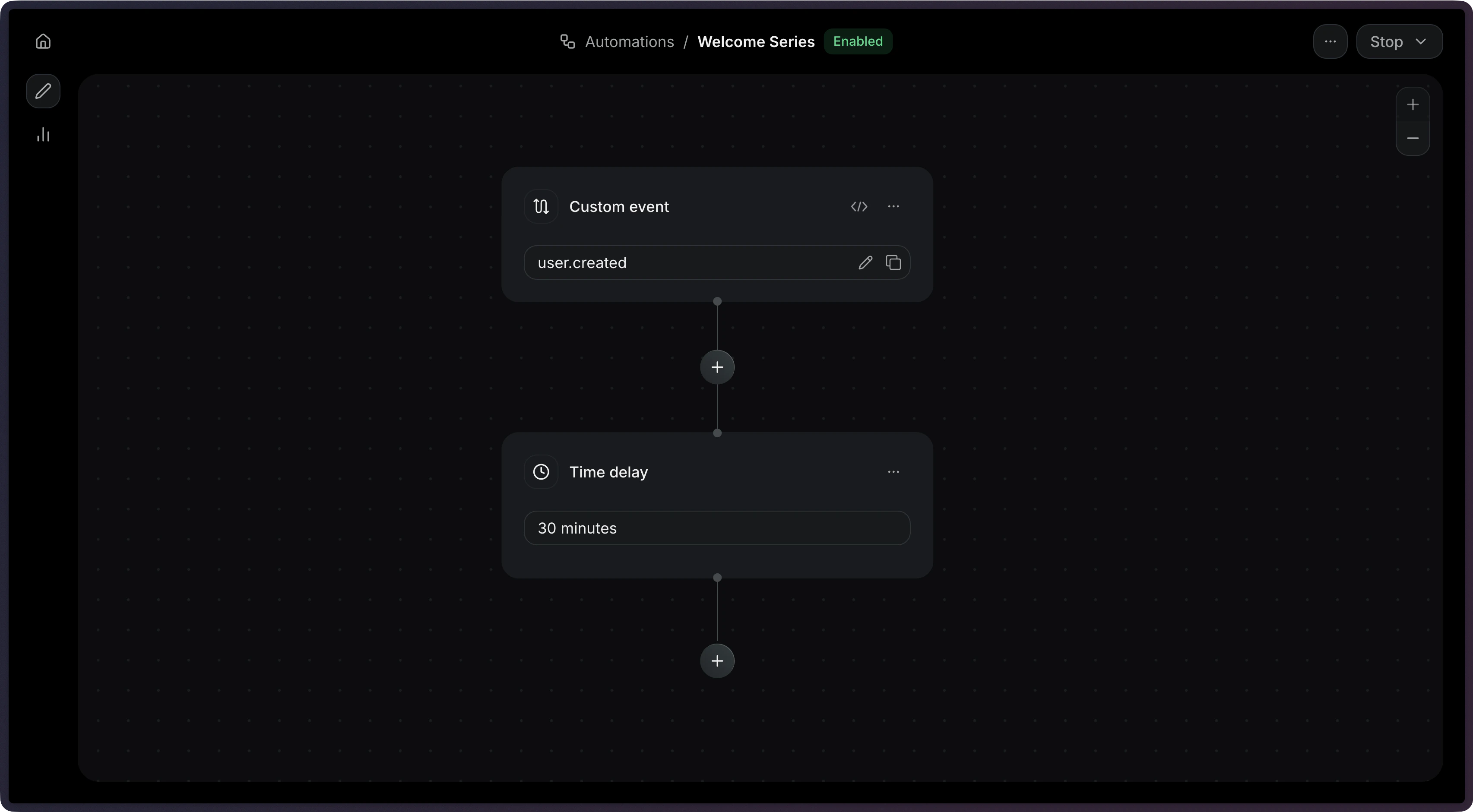
The delay step accepts a single Example durations:
duration field with a human-readable time value.import { Resend } from 'resend';
const resend = new Resend('re_xxxxxxxxx');
const { data, error } = await resend.automations.create({
name: 'Welcome Series',
steps: [
{
key: 'start',
type: 'trigger',
config: { eventName: 'user.created' },
},
{
key: 'wait_1_day',
type: 'delay',
config: { duration: '1 day' },
},
],
connections: [{ from: 'start', to: 'wait_1_day', type: 'default' }],
});
$resend = Resend::client('re_xxxxxxxxx');

$resend->automations->create([
  'name' => 'Welcome Series',
  'steps' => [
    [
      'key' => 'start',
      'type' => 'trigger',
      'config' => ['event_name' => 'user.created'],
    ],
    [
      'key' => 'wait_1_day',
      'type' => 'delay',
      'config' => ['duration' => '1 day'],
    ],
  ],
  'connections' => [['from' => 'start', 'to' => 'wait_1_day', 'type' => 'default']],
]);
import resend

resend.api_key = "re_xxxxxxxxx"

params: resend.Automations.CreateParams = {
  "name": "Welcome Series",
  "steps": [
    {
      "key": "start",
      "type": "trigger",
      "config": {"event_name": "user.created"},
    },
    {
      "key": "wait_1_day",
      "type": "delay",
      "config": {"duration": "1 day"},
    },
  ],
  "connections": [{"from": "start", "to": "wait_1_day", "type": "default"}],
}

resend.Automations.create(params)
require "resend"

Resend.api_key = "re_xxxxxxxxx"

params = {
  name: "Welcome Series",
  steps: [
    {
      key: "start",
      type: "trigger",
      config: { event_name: "user.created" },
    },
    {
      key: "wait_1_day",
      type: "delay",
      config: { duration: "1 day" },
    },
  ],
  connections: [{ from: "start", to: "wait_1_day", type: "default" }],
}

Resend::Automations.create(params)
package main

import "github.com/resend/resend-go/v4"

func main() {
	client := resend.NewClient("re_xxxxxxxxx")

	params := &resend.CreateAutomationRequest{
		Name: "Welcome Series",
		Steps: []resend.AutomationStep{
			{
				Key:  "start",
				Type: resend.AutomationStepTypeTrigger,
				Config: map[string]any{
					"event_name": "user.created",
				},
			},
			{
				Key:  "wait_1_day",
				Type: resend.AutomationStepTypeDelay,
				Config: map[string]any{
					"duration": "1 day",
				},
			},
		},
		Connections: []resend.AutomationConnection{
			{From: "start", To: "wait_1_day", Type: resend.AutomationConnectionTypeDefault},
		},
	}

	client.Automations.Create(params)
}
use resend_rs::{
  types::{
    AutomationStatus, Connection, ConnectionType, CreateAutomationOptions, DelayStepConfig, Step,
    TriggerStepConfig,
  },
  Resend, Result,
};

#[tokio::main]
async fn main() -> Result<()> {
  let resend = Resend::new("re_xxxxxxxxx");

  let opts = CreateAutomationOptions {
    name: "Welcome Series".to_owned(),
    steps: vec![
      Step::Trigger {
        key: "start".to_owned(),
        config: TriggerStepConfig {
          event_name: "user.created".to_owned(),
        },
      },
      Step::Delay {
        key: "wait_1_day".to_owned(),
        config: DelayStepConfig {
          duration: "1 day".to_owned(),
        },
      },
    ],
    connections: vec![Connection::new("start", "wait_1_day").with_type(ConnectionType::Default)],
    status: AutomationStatus::Disabled,
  };
  let _automation = resend.automations.create(opts).await?;

  Ok(())
}
import com.resend.*;
import com.resend.core.exception.ResendException;
import com.resend.services.automations.model.AutomationConnection;
import com.resend.services.automations.model.AutomationStep;
import com.resend.services.automations.model.ConnectionType;
import com.resend.services.automations.model.CreateAutomationOptions;
import com.resend.services.automations.model.CreateAutomationResponseSuccess;

public class Main {
    public static void main(String[] args) throws ResendException {
        Resend resend = new Resend("re_xxxxxxxxx");

        CreateAutomationOptions options = CreateAutomationOptions.builder()
                .name("Welcome Series")
                .steps(
                    AutomationStep.trigger("start")
                        .eventName("user.created")
                        .build(),
                    AutomationStep.delay("wait_1_day")
                        .duration("1 day")
                        .build()
                )
                .connections(
                    AutomationConnection.builder()
                        .from("start")
                        .to("wait_1_day")
                        .type(ConnectionType.DEFAULT)
                        .build()
                )
                .build();

        CreateAutomationResponseSuccess data = resend.automations().create(options);
    }
}
using Resend;
using System.Text.Json;

IResend resend = ResendClient.Create( "re_xxxxxxxxx" );

var startConfig = JsonSerializer.SerializeToElement( new { event_name = "user.created" } );
var delayConfig = JsonSerializer.SerializeToElement( new { duration = "1 day" } );

var resp = await resend.AutomationCreateAsync( new AutomationCreateData()
{
    Name = "Welcome Series",
    Steps = new List<AutomationStepData>
    {
        new AutomationStepData { Ref = "start", Type = "trigger", Config = startConfig },
        new AutomationStepData { Ref = "wait_1_day", Type = "delay", Config = delayConfig },
    },
    Connections = new List<AutomationEdge>
    {
        new AutomationEdge { From = "start", To = "wait_1_day", EdgeType = "default" },
    },
} );
curl -X POST 'https://api.resend.com/automations' \
     -H 'Authorization: Bearer re_xxxxxxxxx' \
     -H 'Content-Type: application/json' \
     -d '{
  "name": "Welcome Series",
  "steps": [{
    "key": "start",
    "type": "trigger",
    "config": { "event_name": "user.created" }
  }, {
    "key": "wait_1_day",
    "type": "delay",
    "config": { "duration": "1 day" }
  }],
  "connections": [
    { "from": "start", "to": "wait_1_day", "type": "default" }
  ]
}'
resend automations create --name "Welcome Series" --file ./automation.json
"30 minutes", "1 hour", "12 hours", "1 day", "3 days", "1 week".The maximum delay is 30 days.
Configuration
string
required
The delay duration in natural language (e.g.
"1 hour", "3 days"). Maximum:
30 days.Example
{
  "key": "wait_1_hour",
  "type": "delay",
  "config": {
    "duration": "1 hour"
  }
}